
From stocktakes and supplier orders to recipe costing and AI forecasting, learn how restaurant inventory software helps teams protect margins and run operations more efficiently.

Constance Halm
8
Oct 2026

Inventory software helps restaurant owners monitor on-hand quantities, manage ordering, and track ingredient costs from a single platform. It brings together sales, supplier orders, recipes, stock counts, invoices, and reporting, giving operators a reliable overview of what is available, what is being used, and what needs to be ordered.
For restaurants, bakeries, coffee shop, small errors quickly affect profit margins. Over-ordering creates surplus, under-ordering creates stockouts, and incorrect portion data makes the food cost percentage difficult to control. Manual spreadsheets also make it harder to benchmark locations, identify write-offs, or ensure that every manager follows the same routine.
The right platform connects with your POS, automates stock deductions and order recommendations, and provides real-time insights. It helps managers limit unnecessary disposal, optimise operations and improve efficiency without adding another complex task. Built for the hospitality and food service industry, it can support kitchen inventory and multi-site reporting.
In this guide, discover which functionality and features to look for, how stock management software supports stock tracking and recipe costing, and how to choose a solution that fits your company, your number of locations, and your growth plans.
This type of inventory platform is a cloud-based system for managing ordering, stock levels, ingredients, recipes, write-offs and margin costs in one place. It combines information from your till, vendors, recipes and stock counts so that operators can understand what has been bought, what has been consumed and what needs to be ordered.
For independent venues, it reduces the administrative work involved in stocktaking and purchases. For growing groups, it creates consistent processes across locations and gives the head office a consolidated view of performance.
Unlike a POS system alone, inventory software shows the relationship between sales, preparation standards, actual consumption, stock discrepancies and ingredient cost. It can also link to accounting, vendor and logistics systems through APIs or EDI.
Different tools solve different operational problems:
For a growing group, these systems should share data reliably. The objective is not necessarily to replace every tool but to create a dependable flow between sales, ordering, inventory and finance.
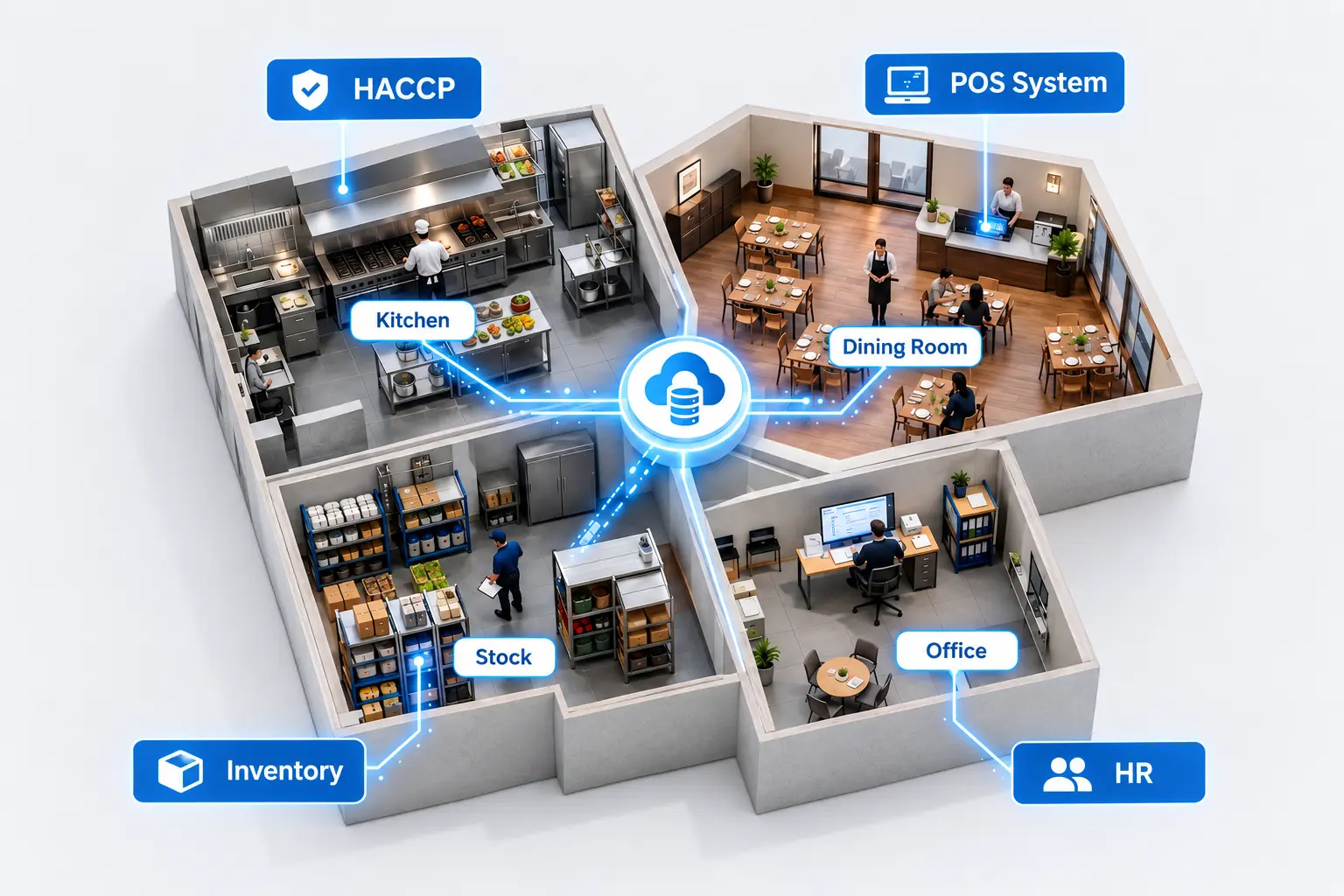
A strong stock management platform should support the full process, from purchase to report. Important functionality and features include:
These features help staff and teams streamline restaurant operations, improve efficiency and make better purchasing decisions. They also provide the data needed for menu engineering, preparation reviews and margin analysis.
{{banner_clients}}
Restaurant inventory management software is a framework for connecting sales, purchasing, physical inventory and financial reporting. It helps operators understand inventory usage, not just the quantity counted at the end of the month.
At the site level, managers can count each item, track ingredients, log preparation and record transfers between storage areas. At head office, operations teams can monitor stock levels for each location, identify unusual usage and study the cost of goods sold across the network.
When POS systems and accounting software share data, sales of individual menu items can trigger automated deductions and more reliable cost calculations. This creates a clear link between what is sold, what is consumed and what should be reordered. It can also automate invoices, reduce manual tasks and give finance teams better reporting.
For restaurant chains, these controls help cut food cost, reduce waste and improve cash visibility without forcing managers to maintain several disconnected spreadsheets. The result is real-time insights and real-time insights that that support faster decisions in the field and at head office.
During a month-end count, a site manager can log a prep task, count an item, add a note and stay focused on service. Templates and guided workflows help new managers get started, while supported integrations keep information flowing between the till, storage areas and finance tools.
A well-chosen system acts on three key levers: time, money and control. It can help restaurant owners reduce avoidable disposal, cut ingredient cost, improve efficiency, boost profitability and protect profit margins.
When ordering, stock tracking, recipe costing, invoice checking and reporting are spread across different spreadsheets; managers spend too much time searching for information. A connected platform creates a more reliable flow from sale to stock deduction, order, delivery and invoice.
By streamlining restaurant operations, staff can spend less time on repetitive administration and more time on service, people and customer satisfaction.
Placing vendor orders, completing stock counts, checking invoices and re-entering product data are repetitive tasks. Structured price lists, automated recommendations and invoice checks reduce administration and give managers more time for staff and customers.
This is particularly valuable for multi-site groups. Head office can standardiseworkflows, while site managers receive clear recommendations instead ofrebuilding orders in spreadsheets.
Reducing ordering errors, food waste, stock discrepancies and emergency orders has a direct impact on food cost. Monitoring the food cost percentage over time helps operators understand whether operational changes are protecting profit margins.
Customer examples from Inpulse include:
“We gained 3 margin points thanks to Inpulse.”Sébastien Billières, Operations Director
Results depend on the concept, number of locations, starting workflows and quality of the available data, but the principle is consistent: small improvements repeated across a network can have a significant financial impact.
The platform helps teams:
The following five stepscreate a reliable foundation.
No ingredient cost or margin calculation can be trusted if recipes are out of date or portions are inconsistent. Accurate technical data is also essential for transferring know-how across a franchise network and supporting menuengineering.
Keep product prices, pack sizes, minimum order quantities, delivery days and leadtimes up to date. An integrated system can also send orders to selected vendors through EDI, reducing manual rekeying and invoicing errors.
A stocktake completed once a quarter does not provide enough visibility. Weekly or monthly stocktakes, completed on mobile and split across storage areas,create a more reliable view of actual stock and consumption.
Categorise breakage, expiry, staff meals, promotional offers and other losses. Without this information, every variance looks unexplained and staff cannot identify the right corrective action.
Benchmark theoretical ingredient cost against actual cost at ingredient, site and weekly level. The difference is often where the most useful margin opportunities can be found.
Inpulse combines inventory, purchasing, forecasting and performance data in oneplatform. It includes:
More than 4,500 restaurants, corners and bakeries use Inpulse. Request a personalised demo to assess how the platform could fit your operation. Resources included in the implementation can cover data preparation,training templates, customer support and a named contact.
The data flow from sale to stock deduction, order and invoice gives site managers a clearer workflow and helps head office maintain reliable data.
There is no single best restaurant software for every business. The right choice depends on your size, concept, operating model and current priority.
The restaurant technology market has grown significantly, with specialist providers focusing on different operational needs. Understanding the main categories can make it easier to identify the tools that are right for your business.
Here are some examples of solutions available in the UK:
Inpulse connects with more than 70 partners, including POS systems, delivery platforms, suppliers and accounting tools. This allows restaurant groups to centralise their operational data and reduce manual data entry.
To check whether your existing software is connected to Inpulse, visit our integrations page.
Pricing depends on the number of sites, users, modules, integrations and support required. When comparing the average cost or starting monthly price, include implementation, training, customer support, invoicing and future growth.
The right question is not only “How much does the software cost?” It's “What return canit deliver?” Include the value of time saved, fewer emergency orders, lower waste, better purchasing accuracy and improved food cost.
A system that managers dislike will not deliver value. Ease of use and implementation support are critical to adoption.
A till in one system, a spreadsheet in another and preparation data in a third create inconsistencies. Once staff stop trusting the data, they stop using it to make decisions.
Out-of-dateprice lists and incorrect preparation data produce unreliable indicators. Clean your product catalogue, units of measure, vendor data and opening quantities before implementation.
Without stock counts and write-off records, you cannot calculate meaningful consumption discrepancies or identify the source of surplus.
The real selection criterion is ROI: how many hours can be saved, how much surplus canbe avoided and how many margin points can be protected? Assess the subscription price against the value created.
This type of software does more than digitise stockakes. It gives operators reliable data about what they order, what they use and where margin is being lost.
The right solution can help restaurants reduce food waste, control ingredient cost,improve operational efficiency and standardise workflows across locations. It does not replace the expertise of restaurant operators. It gives them the information and time needed to make better decisions.
Ready to find out how much margin is hidden in your inventory?





The all-in-one AI platform that guarantees margins for restaurants chains and bakeries.


Inpulse needs your contact information to let you know about our products and services. You can unsubscribe at any time. For more information, read our Privacy Policy.
© 2026 Inpulse. Tous droits réservés. Legal information
Politique de confidentialité.









.webp)

